Author: Daniel Greene

  • Capturing the Light


    Capturing the Light
    Originally uploaded by Daniel Greene

    The act of photographing reminds me of the constantly changing world and the preciousness of each moment.

    Andy had set this artichoke on the kitchen windowsill. The artichoke was past its prime, but I liked the way it looked with the sun hitting it this morning, so I ran and grabbed my camera.

    The light had changed in the 30 seconds it took me to get my camera, and even during the taking of several shots, the light kept changing. While seeing how the light kept changing, and how quickly I was losing the light that had originally caught my eye, I was reminded of the constant changes going on in the world around me (and in myself as well, I suppose), and the preciousness of each moment. As a photographer, I am "delineating light" (photos meaning light and -graphy meaning delineation, see etymology of ‘photography’). Since natural light is constantly changing, we as photographers capture fleeting moments of light.

    But, as people, what do we miss that we don’t capture? Are there moments in our lives, in relationships with people, when the moment is right to be silent or speak up, to be still or to make a move, to look or to listen? Photography is a highly technical hobby as well as an art, and I find that I must remember, as a human being, that there is much to capture other than light.

  • My First Captioned Video on YouTube!


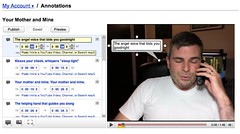
    YouTube Annotations
    Originally uploaded by Daniel Greene

    When I signed on to YouTube this morning, I noticed a new feature called Annotations that allows you to add Speech Bubbles, Notes, and Spotlights to your videos. I realized right away that the first two of these types of annotations gave me a way to caption my videos. They don’t allow for “closed” captioning; everyone who views the video sees them by default. There is a mechanism people can use, though, to turn them off while viewing them by clicking on the Menu button at the bottom of the player.

    This morning, I captioned a video that I recorded on Mother’s Day. At the time of this writing, it seems that you can only see the captions if you view the video on YouTube. YouTube says that, once they get this feature out of beta, they will support embeds, meaning that the annotations will show up when videos are shared in blogs, on Facebook, and the like.

    Although it was time-consuming (it took me about 45 minutes to an hour to caption a one-minute-forty-five-second [1:45] video), the graphical user interface (GUI) was rather intuitive. From my first experience using YouTube’s Annotations, I am certainly willing to use them again. Hooray for an easier way to caption videos!

  • I’m NOT Addicted to Pete’s Fish & Chips

    With all the “I’m Addicted to Pete’s Fish & Chips!” bumper stickers I’ve seen around the Valley, I would have thought I was missing out on a local legend (having never been to one myself).

    I’ll tell you a little secret though: those bumper stickers are free! If people had to pay for them, I don’t think there would be so many.

    I was starving after work yesterday, and here I was sitting in the drive-thru of Pete’s on 27th Ave & Van Buren, so I thought I’d take a commemorative shot of my first time at one of the legendary Pete’s. But I’m telling you the morning after driving the food home and eating it, it’s just a greasy mess! It’s not delicious or special or anything. It’s just over-greasy rectangular slabs of fried fish on top of over-greasy shoestring fries. So, I don’t love Pete’s Fish & Chips; in fact, I don’t even like them!

  • Just Married!


    Just Married!
    Originally uploaded by Daniel Greene.

    I’m posting this on the one-week anniversary of our legal same-sex marriage in California. Since I took it with my Sidekick and uploaded it to Flickr right after our civil ceremony, it’s been viewed (as of this writing) 199 times, had received 53 comments, and 6 people call it a favorite.

    A million thanks to all who made it possible for us to get married legally!

  • Geotagging with my AMOD Photo Tracker AGL3080


    Los Olivos Finishing Tent
    Originally uploaded by Daniel Greene.

    This permanent tent has shade, a misting system, and blowers that they use to blow the water out of the crevices of your car so the water doesn’t come out of the crevices while you’re driving and leave water spots. Interestingly, you can see the tent in the satellite image of this geo-location if you click the map link. I’d say my GPS data logger captured my location almost perfectly for this photo.

    To explain my workflow on this public, geotagged photo:

    I bought a GPS data logger called the AMOD Photo Tracker AGL3080 for $69. All it does is record location from second to second. I synchronized the clock on my camera to the clock on my computer (which is automatically synchronized to an atomic clock). When I got ready to start shooting, I clipped my Photo Tracker on my belt with the carabiner that came with it, and turned it on. I took all the photos I wanted to take, and when I was finished, I turned off the Photo Tracker. When I got home, I hooked up the GPS unit to my computer via USB and dragged and dropped the log onto my desktop (the device shows up on my Mac as an external drive). Then I put my camera’s SD card into a card reader and connected it to my Mac via USB (it shows up on my Mac as an external drive as well). I dragged and dropped all my photos from the shoot into a folder on my desktop.

    Now that I had the photos and the tracklog in my computer, I launched a freeware app called GPS Babel+ and opened the NMEA log and converted it to a GPX XML file. Then I launched another freeware app called GPSPhotoLinker and I loaded the GPX file and the .CR2 (Canon Raw) photo into the app, and I had the app insert the geodata into the EXIF of all the RAW photos.

    I then imported the geotagged RAW photos into Aperture, where I added keywords, version names, and captions– which show up on Flickr as tags, titles, and descriptions respectively (GPSPhotoLinker automatically added the tags Phoenix, Arizona, and United States). I made whatever images adjustments I wanted to. Finally, I used the Aperture FlickrExport plug-in to upload this photo to Flickr and the photo automatically showed up on the map.

    I’ve been manually geotagging for months now by using the Flickr Organizr to drag my photos onto the map, and as complicated as the above process might sound to you, I assure you that this new process is much less time consuming and much more accurate.