Author: Daniel Greene

  • Transforming My Site into a Blog

    Over the last few days, I have transformed danielgreene.com into a blog. I resisted doing a blog for quite a while for several reasons. Blogs can take a lot of time to write and maintain— especially when there are a lot of comments to monitor. I didn’t know anything about the software I would need to create one. Most important, I was afraid that once I got started, there would be no stopping me from saying absolutely everything on my mind. I was afraid my candor might get me into trouble.

    Then I had a talk with Will Pate, Community Ambassador for the Flock Browser, who said, “A professional blog is a great way to gain recognition in your profession.” It suddenly dawned on me— of course I don’t have to say everything on my mind! Of course it doesn’t have to be personal! A blog can be professional! Sure, why not? That one sentence from Will was all I needed to hear to open my mind. I had already been wanting a more interactive “Web 2.0” website. I wanted people to comment on my posts, comment on each other’s comments, blog about my blog, add me to their extended friends’ network, add “trackback” links to my blog, etc. Now the question was: what sort of blogging system will I use to “power” my blog?

    Well, I noticed that Will had a web site with his name as the domain just as I do, and I noticed that his was “powered by WordPress.” I checked into it, and found out that my host, pair Networks, supports WordPress on its servers. Other than the few extra dollars I have to pay pair Networks per month to upgrade my account, WordPress is free. I also chose it because it allows me to have danielgreene.com host the blog natively, rather than having to host it somewhere else like BlogSpot or LiveJournal. I like the fact that it is customizable, and I don’t need to have any navigation bar at the top advertising the blogging system.

    Now, when I go to YouTube or Flickr, I can actually click on those “Blog This” links and blog them. And I can right-click in Flock to “Blog This” anywhere on the Web!

  • How To Send vCard via Bluetooth on Sidekick 3: A Screenshot Tutorial

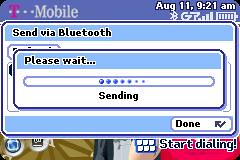
    How To Send vCard via Bluetooth on Sidekick 3 – a photoset on Flickr

    I made an instructional video for YouTube called How To Send vCard via Bluetooth on Sidekick 3 a few weeks ago. Then I discovered Flickr a couple of weeks ago. Then, just a couple of DAYS ago, I discovered that you could capture screenshots on the Sidekick 3. I put it all together and thought, “What a great way to put together a tutorial online!” So here it is.

    Blogged with Flock

  • How to Send vCard via Bluetooth on Sidekick 3: A YouTube Video

    Speaking and signing at the same time, in Pidgin Signed English, I show you how to set your contact information in your address book as your vCard. Then I show you how to turn on Bluetooth and send your vCard to other SK3’s.

  • ASL Introduction on YouTube

    This is my intro in ASL. I say, “Hi, I’m Daniel Greene. I am hearing. I work as an interpreter, and I also sing. I hope you enjoy my movies, whether you are hearing or deaf. Are you interested in learning more about ASL interpreting? Check out my web site, danielgreene.com!

  • FCC Comment: Interpreters ≠ Dial Tone

    I posted the following comment to the FCC regarding Telecommunications Relay Service (TRS) – Docket 03-123.

    I have been told that the FCC considers sign language interpreters to be “equivalent to a dial tone,” and that we are not mandated reporters of abuse. The problem with this is that we are human beings, and unlike text relay operators, we video interpreters actually witness the the sign language users with our eyes. In the dreaded event that a video interpreter were to witness something like a person having a heart attack or stroke, or see a person beaten, raped, or even shot dead before our very eyes, it would cause us irreparable psychological damage if we were forbidden to report it. Granted, a Communications Assistant who performs text relay services may hear something terrible on the voice line, but they can never know for sure what they heard. Video Interpreters (VI’s) are unlike Communications Assistants (CA’s) in that we are eye witnesses to whatever goes on in front of the sign language user’s camera. We should be considered mandated reporters both for the sake of our clients and ourselves. It is a human being’s natural desire, nay, need to “do something about it” when we are witness to abuse. I could not live with myself if I witness such atrocities and did not report it. It doesn’t do our clients any good either for us to remain silent in such dreadful circumstances.

    You will notice that I use the term “Video Interpreter (VI)” in my letter to you. This is the term that has gained universal acceptance among the profession of sign language interpreting. Our work differs from that of CA’s in so many ways that (more…)