Category: Communication

I got my BA in English with a concentration in Communications / Media Study. These posts represent my interest in those fields of study, including: Movies, Television, Websites, Blogging, HTML, CSS, Social Media, etc.

  • My first week with the NOOKcolor


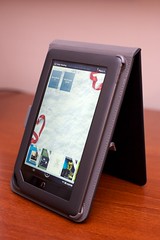
    My new NOOKcolor
    Originally uploaded by Daniel Greene

    Here’s my real-person experience with the Barnes & Noble Nook Color eReader. I’ve owned and used my NOOKcolor for a week now. In my review, I will answer three questions: “Why buy the NOOKcolor instead of the iPad or Samsung Galaxy Tab?”, “What do you wish you had known before you bought the NOOKcolor?”, and “What do you love about the NOOKcolor?”

    Why not just buy the iPad or Galaxy Tab?

    The NOOKcolor is half the price of the cheapest iPad, and even with a cover is less than half the price of the Galaxy Tab; it has a beautiful 7″ wide-screen-format full color LCD (which I actually find to be a better fit for my hands than the iPad); it comes with 8 GB internal memory and a MicroSD card slot for expansion (which the iPad doesn’t have); it has a full web browser (Google Chrome) that allows you to view anything on the Web that isn’t made with Macromedia Flash (which the iPad doesn’t support, either), and it has QuickOffice software that allows you to view Word, Excel, and Powerpoint documents. It allows you to drag and drop (with a standard MicroUSB cable, not the proprietary iPod/iPad connector) files such as audiobooks, music, photos, documents, etc. for listening and viewing (even in a photo slideshow) on the pretty screen. There are a few games (Chess, Crosswords, Sudoku), and you can use the Pandora app to listen to streaming music if you get bored of the music files you loaded into the device. There may be more “Extras” to come (free or for purchase), as well. As for the Galaxy Tab, I don’t need a portable videoconferencing device, and I don’t need another Android phone. I still like my Nexus One, thanks.

    As for the NOOKcolor’s web browsing capabilities, so I have watched YouTube videos, checked my GMail, caught up on Facebook and Flickr, read content on news websites, downloaded content from the Barnes & Noble store (some free or 99¢ public domain books) and free ePub download sites, and managed my Netflix queue. Primarily, though, I enjoy the NOOKcolor for reading e-books. Go figure! I’m not a big gamer, so I don’t care about iPad games designed for the accelerometer, and I don’t expect to do much document creation on a tablet, so I don’t miss iWork. For my intents and purposes, the NOOKcolor does everything I would want the iPad or Galaxy Tab to do— for half the price.

    What I wish I had known before I bought the NOOKcolor

    • You can only use the LendMe™ feature once per book—only one time the whole time you own the book!—and you can only use the LendMe™ feature with a limited selection of Barnes & Noble books, not with all of them! You can only “lend” a B & N book for seven days— just long enough for your friend to get hooked and click “Buy Now” to buy it from Barnes & Noble, unless they read fast and don’t put off starting the book. In other words, LendMe™ isn’t to help you save money; it’s to help B & N make money.
    • You can only use the Share feature to post quotations, write reviews, make recommendations, etc. about Barnes & Noble books, not with any other books! Yes, the Barnes & Noble books are standard ePub, but they’re specialized in such a way that your NOOKcolor knows if you’re reading any other ePub and it won’t let you use the Share feature with anything but their books. What this means is that you have to pay, say, $1 or $2 for a public domain book you can get free elsewhere for the privilege of giving Barnes & Noble free advertising so your friends are encouraged to buy these old public domain books from them instead of downloading them from any number of other ePub download sites.
    • On a related note: the only books that are guaranteed to show up in your library with cover art are your Barnes & Noble books. This may be a bug they will fix, but I wouldn’t count on it. Why? Because having their books and not other supplier’s books show up with eye candy is another reason for you to buy books from them. It’s a way of devaluing the competition’s product and making you want to fill your virtual bookshelves with books that look pretty. When you drag and drop ePub books you got from other places, what you get on your NOOKcolor screen is just a little gray rectangle with a text title that’s often truncated. When you buy a B & N book, you get the full color cover art. Nice, eh? You also sometimes get little badges that say “Sample” or “New” or “LendMe™” on the B & N book covers—dandy.
    • You will have to charge your NOOKcolor every day with regular use, and be sure to bring your NOOKcolor charger with you if you’re planning to use it a lot in a day and be away from home all day.

    Bitter? Not really; just disillusioned. I still my NOOKcolor, and here’s why:

    What do you love about the NOOKcolor?

    • I love its size and shape and curves
    • I love its gorgeous touch screen
    • I love its intuitive interface
    • I love that it’s a pleasure to read on*
    • I love that it has WiFi and a full Web browser that lets me see anything on the Internet I want (as long as it’s not Flash)
    • I LOVE the dictionary— a must have, I think, for any ebook reader. With the dictionary on the NOOKcolor, it will also take you to Wikipedia or Google if you have a WiFi connection and want more info.
    • I love how easy it is to rate books you’ve gotten from the BN website, and I think I’ll love the LendMe™ feature because it’s better than not being able to share books and/or try them before you buy them.
    • Oh, and I do like it that you can spend up to an hour in a Barnes & Noble store reading a book free of charge, although I don’t know if I’ll ever actually do it, and—again—I’m sure it’s designed to make them money, not save you money.

    So, there’s my honest opinion about the NOOKcolor. I’m glad I got it. I chose it carefully over the e-readers from other manufacturers such as Amazon, Apple, and Sony. I would recommend the NOOKcolor to a friend. Or to you! And, of course, because I care about my friends, and about you, “Gentle Reader,” I’m warning you of its shortcomings as well.

    Did this review help you? Did it save you $300? If so, would you reward the time I took to write this for you by giving me a small donation of even $1? I work hard on these blog posts and I do them without sponsorship from tech companies or advertisements. If you like, please give.

    *P.S. I just have to laugh at the television ad with the woman reading her Kindle at the pool next to a guy who can’t read on his iPad. I don’t read at the pool! In fact, I can count on my fingers and toes the number of minutes I spend on the deck of a pool each year. I need an e-reader to be easy to read indoors without having to sit directly under a lamp or with a booklight.

  • IPTC Scene Codes to make your photos more searchable

    Lately, I’ve been spending a lot of time organizing the photos in my Aperture Library to make my photos more searchable to potential buyers. I spent some time looking into stock photography references such as the Getty Images Keyword Guide and the International Press Telecommunications Council (IPTC) website to learn how to make it easier for people to find and Request to license my Flickr photos through Getty Images or me. In the process of SEO-ing (Search Engine Optimizing) my photos, I’ve found that many of the keywords recommended for stock photography are also IPTC Scene codes.

    If you have an image editing / photo organizing application, you may input these scene codes in the IPTC Scene field under the Image section of the IPTC Core metadata. These codes (or keywords, if you will) help describe what a photo is “of.” You may also wish to add them as keywords or “tags” since sites like Flickr make it possible for people to search for photos by “tag.”

    I’m sharing these IPTC NewsCodes™ under the IPTC licensing agreement. I hope these metadata help your photos and mine to be found and purchased in a prosperous new year!

    IPTC Scene Codes

    Copyright 2010, IPTC, http://www.iptc.org, All Rights Reserved.

    headshot
    A head only view of a person (or animal/s) or persons as in a montage
    half-length
    A torso and head view of a person or persons
    full-length
    A view from head to toe of a person or persons
    profile
    A view of a person from the side
    rear view
    A view of a person or persons from the rear
    single
    A view of only one person, object or animal
    couple
    A view of two people who are in a personal relationship, for example engaged, married or in a romantic partnership
    two
    A view of two people
    group
    A view of more than two people
    general view
    An overall view of the subject and its surrounds
    panoramic view
    A panoramic or wide angle view of a subject and its surrounds
    aerial view
    A view taken from above
    under-water
    A photo taken under water
    night scene
    A photo taken during darkness
    satellite
    A photo taken from a satellite in orbit
    exterior view
    A photo that shows the exterior of a building or other object
    interior view
    A scene or view of the interior of a building or other object
    close-up
    A view of, or part of a person/object taken at close range in order to emphasize detail or accentuate mood. Macro photography.
    action
    Subject in motion such as children jumping, horse running
    performing
    Subject or subjects on a stage performing to an audience
    posing
    Subject or subjects posing such as a “victory” pose or other stance that symbolizes leadership
    symbolic
    A posed picture symbolizing an event – two rings for marriage
    off-beat
    An attractive, perhaps fun picture of everyday events – dog with sunglasses, people cooling off in the fountain
    movie scene
    Photos taken during the shooting of a movie or TV production
  • The -isms & -ists of Oralism & Oralists

    Since so many people responded on my blog to the first video about this topic, “Re Oralism vs Speaking” that I embedded in a blog post, I have been responding and thinking about this issue. One thing that stands out for me is the meaning of the suffices -ism and -ist. These can simply mean “system” or “practitioner” but they also have loaded connotations of strong belief systems and prejudices– and the people who espouse such attitudes and prejudices.

    My view is that there is nothing wrong with any mode of communication, be it ASL, signed English, or speaking and speechreading. Although I realize that “oralism” is a hot-button issue with many deaf people for whom it carries heavy emotional associations, I believe that if all of that emotional baggage is put aside, it can be seen that speaking and speechreading are simply ways of communicating. (To quote from William Shakespeare’s Hamlet, “…there is nothing either good or bad but thinking makes it so.”)

    Far be it from me to tell oral deaf what to call themselves, but (more…)

  • Re Oralism vs Speaking

    This is my response to Ella Mae Lentz’s vlog about the difference between the philosophy of oralism and the mere act of speaking, either by deaf or hearing people. In this video, signed in ASL—PSE (along the continuum), I tell of my experience as an interpreter with oral deaf, English-oriented deaf, and strongly ASL deaf people. In my experience, I have not found oral deaf people to be against signing deaf or condescending toward culturally deaf people who choose to use sign language instead of speaking and lipreading. I share my experience being an oral transliterator for certain deaf people who were able to read almost 100% of what I mouthed, despite the “myth” that oral deaf people understand only 30–40% of what the get from reading lips. I also share my experience of having a deaf boyfriend who was culturally deaf and very strong in ASL, not so strong in English. When his mother came to visit, she insisted that he could read her lips even when she wasn’t facing him. He looked to me for interpretation, and I thought, “Why should I have to interpret for my boyfriend and his mother? Come on, Mom, learn sign!”

    My basic message echoes what Ella said in her blog: (more…)

  • ASL Intro to my new YouTube channel DanielJamesGreene

    A quick ASL introduction to my new channel named after my full name: danieljamesgreene. I used to be azsingersigner, but I decided to transition to a new channel with a username that would be more long-lasting than something that begins with the abbreviation for a state. If you liked my other channel with the videos of singing, ASL signing, closed-captioning, cute pet videos, discussions of linguistics and other commentary, then please move over here to danieljamesgreene and subscribe to my new channel. Thanks for watching, and I look forward to seeing more and more of you. Until then…! 🙂

    P.S. Our new dog’s name is Zoey. Ain’t she sweet?