This is me singing Cole Porter’s song “I Concentrate on You.” I used YouTube’s “Captions and Subtitles” feature to upload a subtitle file. I hand-coded the subtitle file in BBEdit using the subtitle (.sub) format. To view the video with captions, click the up-arrow button on the bottom-right corner of the screen and choose CC, English: English captions.
Tag: closed-captioning
Articles about closed-captioning, videos with closed-captioning
-
Singing & signing “Some Children See Him”
I purposefully adapted some of the hand-shapes to create sign-rhymes. While no song that is simultaneously sung and signed is truly ASL, I do hope that I have created something here that can be enjoyed by both hearing and deaf people. I also believe that people of all faiths can appreciate the hope that each newborn child brings: that he or she may help to heal this world.
-
My First Captioned Video on YouTube!
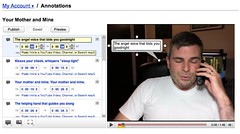
When I signed on to YouTube this morning, I noticed a new feature called Annotations that allows you to add Speech Bubbles, Notes, and Spotlights to your videos. I realized right away that the first two of these types of annotations gave me a way to caption my videos. They don’t allow for “closed” captioning; everyone who views the video sees them by default. There is a mechanism people can use, though, to turn them off while viewing them by clicking on the Menu button at the bottom of the player.
This morning, I captioned a video that I recorded on Mother’s Day. At the time of this writing, it seems that you can only see the captions if you view the video on YouTube. YouTube says that, once they get this feature out of beta, they will support embeds, meaning that the annotations will show up when videos are shared in blogs, on Facebook, and the like.
Although it was time-consuming (it took me about 45 minutes to an hour to caption a one-minute-forty-five-second [1:45] video), the graphical user interface (GUI) was rather intuitive. From my first experience using YouTube’s Annotations, I am certainly willing to use them again. Hooray for an easier way to caption videos!
-
Singing “Your Mother And Mine” to Mom on Mother’s Day
I called my mom on Mother’s Day and sang her this song from Peter Pan that she used to sing to me when tucking me in at night. (more…)
-
iTunes Movies and TV Shows — Captioned?
While Apple has announced a new Apple TV and movie rentals on iTunes, now more than ever it’s high time they made sure that all their video content is closed captioned. With the writers’ strike affecting television programming and more people switching to downloadable content, let’s not take a huge step backward by delivering a huge mess of inaccessible content over the Internet! The ADA does not require Internet deliverables to be closed-captioned because the ADA was drafted before the Internet, but the spirit of the law is to ensure that people have access to media, and since most movies and television shows have already been captioned for legacy media, it shouldn’t be difficult to deliver those captions along with new media. Apple has put the technology in place for the viewing of closed captions in iTunes, QuickTime, and iPods. The next step is actually selling and renting closed-captioned videos!
 Daniel Greene