Category: Communication

I got my BA in English with a concentration in Communications / Media Study. These posts represent my interest in those fields of study, including: Movies, Television, Websites, Blogging, HTML, CSS, Social Media, etc.

  • What is Septopus?

    Septopus came into my awareness as a weird word a coworker would use whenever he got bored at work. If a call came in and he was saying, “one moment while I connect you to…” and the caller hung up, he would say, “Septopus.” The more bored I got at work, the more I began to imagine who this Septopus was. Another coworker and I started making up things about Septopus with the coworker who started talking about him. With my love for advertising, I started creating mock ad campaign spots such as, “When you’ve got your hands full, an eighth tentacle is just one more thing to worry about. Simplify your life– with Septopus!” My friends and I would laugh hysterically, which is just what we needed to lift our spirits.

    It was at this same time that I joined the social short messaging website Twitter. So I figured, “Why just send silly Septopus IMs to my friends at work when I could intrigue Earthlings everywhere?” So I started putting my IMs to coworkers into my Twitter “tweets” as well.

    Little did I know until I Googled it that there actually was an episode of Home Movies called “The Septopus!” When I pointed this out to my coworker who had started the whole thing, he confessed that he loved that episode and hasn’t been able to stop thinking about Septopus since he first watched it.

    So, if you see me tweeting about Septopus (with the hashtag #Septopus), you’ll know what I’m doing– just having fun, breaking up monotony, and honing my copywriting skills. If you like Septopus, feel free to tweet about him with the hashtag #Septopus. Who knows? Maybe a worldwide chorus will sing his praises!

  • Chain3d


    Chained to the Sea
    Originally uploaded by Daniel Greene

    Just as a boat is chained to the sea, sometimes I feel chained to Flickr.

    I am now going through the 420 photos I took during the six days of my trip. Four hundred and twenty photos that all came out well. Yes, there are some things that I took multiple shots of in order to get the best one, but still… how do you work your way through all that and post it on Flickr without boring people? I’ve been limiting myself to posting only three or four photos a day so that people will look at them, which seems to be working, except I have to ask myself why I share all these photos with the world. I took this working vacation on my own, and one of the reasons I took these photos was to share them with my husband, Andy, who couldn’t come on the trip with me. That makes sense to me– to want to share with my husband everything I wish I could have shared with him while we were apart. And I suppose it makes sense to want to share photos with family and close friends. But I’m starting to wonder why I care whether people I’ve never met will stop and look at my photos. I hardly make any money giving my photos away. I could write travel articles and get paid for the work I put into taking, geotagging, editing, organizing, naming, describing my photos… but I don’t. Instead, I spend several hours each day on the computer and on Flickr. I post photos and look at other people’s photos. I enjoy this, but often it seems like work.

    I sometimes look at what I do as a creative outlet and a chance to share information with others just for the sake of sharing. I guess there’s a part of me that (more…)

  • Tribute to Navajo Code Talkers

    This giant sculpture at the corner of Central & Thomas in Phoenix, AZ is a tribute to Navajo Code Talkers. I didn’t know that when I took the photo the other day; I just wanted a shot of a landmark I’ve always admired but never known anything about. Yesterday, I braved the 108º heat to take a photo of the plaque. I’m sharing it because I think it’s important to know this bit of WWII history.

    Here is the inscription on the plaque:

    Tribute to Navajo Code Talkers

    This tribute represents the spirit of the Navajo Code Talkers, a group of more than 400 U.S. Marines who bravely served their country during World War II.

    Their mission: to utilize the Navajo language in the creation of an unbreakable secret code. Between 1942 and 1945, the Navajo Code Talkers used this code, and their skills as radio operators, to provide a secure method of communications vital to America’s victory.

    Among many Native Americans, the flute is a communications tool used to signal the end of confrontation and the coming of peace. This tribute represents the advancement of peace for all future generations.

    This is the first permanent tribute to honor the Navajo Code Talkers.

    "Tribute to Navajo Code Talkers" by Doug Hyde, 1989. Commissioned through the Heard Museum by Best West Properties, Inc. and the Koll Company.

  • My First Captioned Video on YouTube!


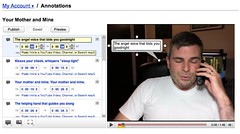
    YouTube Annotations
    Originally uploaded by Daniel Greene

    When I signed on to YouTube this morning, I noticed a new feature called Annotations that allows you to add Speech Bubbles, Notes, and Spotlights to your videos. I realized right away that the first two of these types of annotations gave me a way to caption my videos. They don’t allow for “closed” captioning; everyone who views the video sees them by default. There is a mechanism people can use, though, to turn them off while viewing them by clicking on the Menu button at the bottom of the player.

    This morning, I captioned a video that I recorded on Mother’s Day. At the time of this writing, it seems that you can only see the captions if you view the video on YouTube. YouTube says that, once they get this feature out of beta, they will support embeds, meaning that the annotations will show up when videos are shared in blogs, on Facebook, and the like.

    Although it was time-consuming (it took me about 45 minutes to an hour to caption a one-minute-forty-five-second [1:45] video), the graphical user interface (GUI) was rather intuitive. From my first experience using YouTube’s Annotations, I am certainly willing to use them again. Hooray for an easier way to caption videos!

  • Geotagging with my AMOD Photo Tracker AGL3080


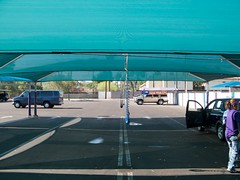
    Los Olivos Finishing Tent
    Originally uploaded by Daniel Greene.

    This permanent tent has shade, a misting system, and blowers that they use to blow the water out of the crevices of your car so the water doesn’t come out of the crevices while you’re driving and leave water spots. Interestingly, you can see the tent in the satellite image of this geo-location if you click the map link. I’d say my GPS data logger captured my location almost perfectly for this photo.

    To explain my workflow on this public, geotagged photo:

    I bought a GPS data logger called the AMOD Photo Tracker AGL3080 for $69. All it does is record location from second to second. I synchronized the clock on my camera to the clock on my computer (which is automatically synchronized to an atomic clock). When I got ready to start shooting, I clipped my Photo Tracker on my belt with the carabiner that came with it, and turned it on. I took all the photos I wanted to take, and when I was finished, I turned off the Photo Tracker. When I got home, I hooked up the GPS unit to my computer via USB and dragged and dropped the log onto my desktop (the device shows up on my Mac as an external drive). Then I put my camera’s SD card into a card reader and connected it to my Mac via USB (it shows up on my Mac as an external drive as well). I dragged and dropped all my photos from the shoot into a folder on my desktop.

    Now that I had the photos and the tracklog in my computer, I launched a freeware app called GPS Babel+ and opened the NMEA log and converted it to a GPX XML file. Then I launched another freeware app called GPSPhotoLinker and I loaded the GPX file and the .CR2 (Canon Raw) photo into the app, and I had the app insert the geodata into the EXIF of all the RAW photos.

    I then imported the geotagged RAW photos into Aperture, where I added keywords, version names, and captions– which show up on Flickr as tags, titles, and descriptions respectively (GPSPhotoLinker automatically added the tags Phoenix, Arizona, and United States). I made whatever images adjustments I wanted to. Finally, I used the Aperture FlickrExport plug-in to upload this photo to Flickr and the photo automatically showed up on the map.

    I’ve been manually geotagging for months now by using the Flickr Organizr to drag my photos onto the map, and as complicated as the above process might sound to you, I assure you that this new process is much less time consuming and much more accurate.