Category: Communication

I got my BA in English with a concentration in Communications / Media Study. These posts represent my interest in those fields of study, including: Movies, Television, Websites, Blogging, HTML, CSS, Social Media, etc.

  • Blog 2014: Free WordPress themes that display bylines

    This is an update to a post I wrote in September 2012 titled WordPress.com themes that display author bylines, which listed free WordPress themes of 2012 that displayed bylines on both posts pages and single posts, single posts only, or not at all. My 2012 post served as an update to another blogger’s post Author and profile displayed or not (Panos, 2009; 2011). This present post covers all free WordPress Themes for Blogs at WordPress.com from January 2012 through July 2014.

    Byline Displayed
    Screenshot of a byline displaying in a post info/meta section

    A matter of style

    Displaying an author’s name is a matter of style, not content. As I wrote in WordPress themes not showing author bylines explained, the author’s byline is on every WordPress post and posts page. It is always there in the HTML; whether it is displayed or hidden is an effect of CSS that makes up the theme. It has no affect on search engine optimization (SEO) or Google Authorship.
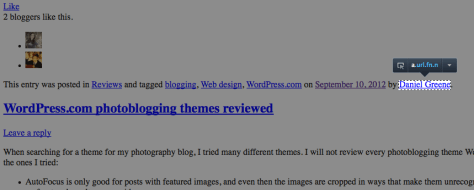
    Screenshot of hidden byline exposed by stripping CSS, courtesy of Josh, a WordPress Happiness Engineer
    Screenshot of hidden byline exposed by stripping CSS, courtesy of Josh, a WordPress Happiness Engineer

    A matter of preference

    Some authors feel no need to have their bylines displayed except on single posts; for them, there are themes that hide bylines on posts pages. Others have multi-author blogs and want each author’s byline displayed everywhere. (Mind, I tested all these themes on my single-author blog.) Others, especially in organizational blogs, might want to present a more collective identity; for them, there are themes that hide bylines on all posts.

    Here, then, is a list of free WordPress themes released from January 2012 through July 2014 that do and do not display bylines on single-author blogs: (more…)

  • I have only made this longer because I have not had the leisure…

    Je n’ai fait celle-ci plus longue que parce que je n’ai pas eu le loisir de la faire plus courte.

    –Blaise Pascal

    Translation: I have only made this longer because I have not had the leisure of making it shorter.

  • Blog 2014: Adding social media links

    Blog 2014: Adding social media links

    Where I learned how to add social media buttons, and where I found them

    Today, I added custom social media links to my secondary menu, which appears on the left sidebar in the Twenty-Fourteen WordPress theme I’m using now. I did this because Twenty-Fourteen doesn’t have social links in the theme, and I wanted them near the top of my blog layout. To learn how to add them, I started by reading the WordPress Support article “Add Social Media Buttons to Your Sidebar or Footer.” When I did a Google Image search of ‘free social media icons’, as suggested in the support article, I found my favorite icon set at GraphicsFuel: 20 Popular Social Media Icons (PSD & PNG). Thank you, GraphicsFuel!

    What code I used

    I used the HTML shown on the support article, but I amended it with a bit of CSS to put some padding (space) to the right and bottom of the buttons so they didn’t look stuck together. While I was at it, I took the width and height properties out of the HTML and put them into the CSS where they belong (since they are style, not structure). Here is a sample of the style code I added to the img element for my customization:

    style="width:35px;height:35px;padding-right:5px;padding-bottom:5px;"
    

    How it looks today

    Of course things will change with time as I change themes or widgets, but here is what my blog looks like as of this writing, with the new social media button links I added to the left sidebar:

    A screenshot of the front page of my blog on July 7, 2014
    A screenshot of the front page of my blog on July 7, 2014

    Why I wrote this

    I always like to share what I learn with others who might benefit, and I like to give credit where it’s due. I hope you find it helpful. Please let me know.

  • Unicode: What the world needs now is love

    Last week, a Deaf friend of mine made a good point about Unicode adding a “raised middle finger” symbol to the new standard: “They still need an ASL ILY emoji.” Right she is! If you can flip someone the bird, you should be able to say “I love you” too. Perhaps submitting a character proposal to Unicode is in order.
    I+L+K=ILKsign

    References

    Unicode 7.0 Miscellaneous Symbols and Pictographs (PDF)
    Original Facebook post: