
I’m excited to be on a public interpreting assignment this morning, on call to interpret for any ASL user (deaf or hard-of-hearing person) who wants to see and learn about the accessibilty features of Valley Metro Light Rail. Light rail will start running here in the Valley of the Sun (Phoenix, Tempe, and Mesa) on December 27, and will be free through December 31. Today, at the 38th St / Washington station, we’re here from 9a-Noon and 2p-5p. I’m learning a lot in the process of interpreting and asking questions myself between clients, and I’m totally jazzed about riding the rail when it opens!
Tag: Phoenix
-
Exciting Assignment – Light Rail!
-
Library –> Geotagged with the G1!
Why buy books when you can borrow? I love my public library!
I took this photo on my new T-Mobile G1 with Google. It automatically geotagged it before I emailed it to Flickr. For those who are wondering how to geotag photos with the G1, I’ll explain– and then you’ll see how easy it is!
When you go to the Camera app, hit the Menu button before you take a shot. Select Settings, and then select “Store location in pictures.” This setting will stick until you change it again.
For even greater accuracy; i.e. to pin your location down to Street level, go to the Home screen and pull up Apps; then select the Settings icon. Then select Security & location. Then select Enable GPS satellites and make sure it’s checked. Deselecting it will conserve battery power, but only when you’re using Maps or an app that uses Maps, such as Camera if you selected “Store location in pictures.” You can always deselect it if you want to save battery power and/or don’t care for pinpoint accuracy.
I love how effortless it is to take and share geotagged photos with the G1, and I am fully satisfied with its accuracy. My husband and I are going to the Mediterranean for two weeks, and while we’re there, I will take geotagged photos with the G1 in Airplane mode (because the GPS works even when wireless services are turned off), and when I find free WiFi hotspots, I’ll moblog them to our family website, smithersgreene.net
And when we get back home, I can’t wait to borrow another great book from the library!
-
Tribute to Navajo Code Talkers
This giant sculpture at the corner of Central & Thomas in Phoenix, AZ is a tribute to Navajo Code Talkers. I didn’t know that when I took the photo the other day; I just wanted a shot of a landmark I’ve always admired but never known anything about. Yesterday, I braved the 108º heat to take a photo of the plaque. I’m sharing it because I think it’s important to know this bit of WWII history.
Here is the inscription on the plaque:
Tribute to Navajo Code TalkersThis tribute represents the spirit of the Navajo Code Talkers, a group of more than 400 U.S. Marines who bravely served their country during World War II.
Their mission: to utilize the Navajo language in the creation of an unbreakable secret code. Between 1942 and 1945, the Navajo Code Talkers used this code, and their skills as radio operators, to provide a secure method of communications vital to America’s victory.
Among many Native Americans, the flute is a communications tool used to signal the end of confrontation and the coming of peace. This tribute represents the advancement of peace for all future generations.
This is the first permanent tribute to honor the Navajo Code Talkers.
"Tribute to Navajo Code Talkers" by Doug Hyde, 1989. Commissioned through the Heard Museum by Best West Properties, Inc. and the Koll Company.
-
Capturing the Light
The act of photographing reminds me of the constantly changing world and the preciousness of each moment.
Andy had set this artichoke on the kitchen windowsill. The artichoke was past its prime, but I liked the way it looked with the sun hitting it this morning, so I ran and grabbed my camera.
The light had changed in the 30 seconds it took me to get my camera, and even during the taking of several shots, the light kept changing. While seeing how the light kept changing, and how quickly I was losing the light that had originally caught my eye, I was reminded of the constant changes going on in the world around me (and in myself as well, I suppose), and the preciousness of each moment. As a photographer, I am "delineating light" (photos meaning light and -graphy meaning delineation, see etymology of ‘photography’). Since natural light is constantly changing, we as photographers capture fleeting moments of light.
But, as people, what do we miss that we don’t capture? Are there moments in our lives, in relationships with people, when the moment is right to be silent or speak up, to be still or to make a move, to look or to listen? Photography is a highly technical hobby as well as an art, and I find that I must remember, as a human being, that there is much to capture other than light.
-
Geotagging with my AMOD Photo Tracker AGL3080
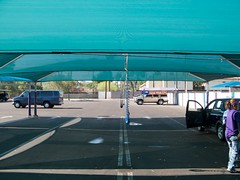
This permanent tent has shade, a misting system, and blowers that they use to blow the water out of the crevices of your car so the water doesn’t come out of the crevices while you’re driving and leave water spots. Interestingly, you can see the tent in the satellite image of this geo-location if you click the map link. I’d say my GPS data logger captured my location almost perfectly for this photo.
To explain my workflow on this public, geotagged photo:
I bought a GPS data logger called the AMOD Photo Tracker AGL3080 for $69. All it does is record location from second to second. I synchronized the clock on my camera to the clock on my computer (which is automatically synchronized to an atomic clock). When I got ready to start shooting, I clipped my Photo Tracker on my belt with the carabiner that came with it, and turned it on. I took all the photos I wanted to take, and when I was finished, I turned off the Photo Tracker. When I got home, I hooked up the GPS unit to my computer via USB and dragged and dropped the log onto my desktop (the device shows up on my Mac as an external drive). Then I put my camera’s SD card into a card reader and connected it to my Mac via USB (it shows up on my Mac as an external drive as well). I dragged and dropped all my photos from the shoot into a folder on my desktop.
Now that I had the photos and the tracklog in my computer, I launched a freeware app called GPS Babel+ and opened the NMEA log and converted it to a GPX XML file. Then I launched another freeware app called GPSPhotoLinker and I loaded the GPX file and the .CR2 (Canon Raw) photo into the app, and I had the app insert the geodata into the EXIF of all the RAW photos.
I then imported the geotagged RAW photos into Aperture, where I added keywords, version names, and captions– which show up on Flickr as tags, titles, and descriptions respectively (GPSPhotoLinker automatically added the tags Phoenix, Arizona, and United States). I made whatever images adjustments I wanted to. Finally, I used the Aperture FlickrExport plug-in to upload this photo to Flickr and the photo automatically showed up on the map.
I’ve been manually geotagging for months now by using the Flickr Organizr to drag my photos onto the map, and as complicated as the above process might sound to you, I assure you that this new process is much less time consuming and much more accurate.



 Daniel Greene