I recommend Work With Color’s Color Schemer to get complementary colors and multi-color palettes for blogs. To customize two of my blogs, I used the OS X color picker “eye dropper” to copy the color of an element of a blog’s default style and find out what the color’s hexadecimal code was. Then I entered the hex code it into this site, clicked some buttons, and it showed me color schemes to create a pleasing palette.
Tag: blogging
Blogging, Web authoring, Web publishing, Web design…
-
I made the Adventures in Freelance Translation blog…
I made the Adventures in Freelance Translation blog’s Weekly Favorites (Sep 10–16). Seems like a nice blog, so I’ve added it to my blogroll.
-
WordPress themes not showing author bylines explained
The other day, I expressed my concern on the WordPress Support Forums that my author bylines were gone from my posts in this blog using the Twenty Twelve theme. Today I got a response from staff explaining that, because of feedback from the WordPress community, they started using CSS (the style markup that composes the themes) to hide the author byline on some, but not all, themes. This makes the byline invisible in the normal, theme/CSS-enabled view, but if you view the page without the theme/CSS you will see the bylines.
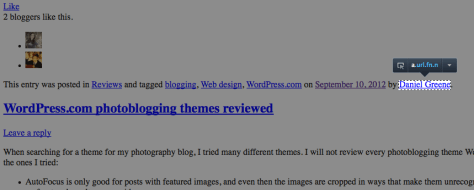
Screenshot courtesy of Josh, a WordPress Happiness Engineer This means the search engines can read the bylines and verify authorship. I checked this with Google’s Rich Snippet Testing Tool and found the search engine did, in fact, read my byline and verify my authorship. This is good to know!
For anyone who knows HTML and CSS and is curious, here is the HTML:
<span class="by-author"> by <a title="View all posts by Daniel Greene" href="https://danielgreene.com/author/danielgreene/" rel="author">Daniel Greene</a></span>
And here is the CSS that does the trick:
.by-author {display: none;}If you are interested in viewing the code on your own blog, there are various ways to view source code.
-
WordPress.com themes that support post formats, WordAds, and bylines
I’ve been looking for a theme that will support my WordAds account, support post formats, and show my byline. As of this writing, only 57 out of 206 themes support post formats. Only 24 support post formats and WordAds. I wonder how many of those 24 show bylines. Let’s see: (more…)
-
WordPress.com photoblogging themes reviewed
When searching for a theme for my photography blog, I tried many different themes. I will not review every photoblogging theme WordPress makes, but here are my thoughts on the ones I tried:
- AutoFocus is only good for posts with featured images, and even then the images are cropped in ways that make them unrecognizable. No post formats, I guess. No bylines on front and results pages, either.
- Ideation & Intent is great for photoblogs, but not much else, because who wants to have a sidebar called Photos if you don’t have a lot of photos? It does show bylines on main navigation. It has no post formats, but if all you post is photos, that’s fine. Colorful and clean with the orange and blue text on white background, and very image rich. I love it for my photoblog.
- Mixfolio is only good if you have featured images for every post; otherwise, you get a black rectangle that says “Featured Image Missing” on each preview on front and results pages.
- Petite Melodies only looks good if you have featured images for every post. It shows no bylines in navigation page. It has no post formats.
- Portfolio (a Premium theme) has all kinds of customization options, bylines, and no post formats.
- Vintage camera has no bylines and no post formats.
- Yoko shows no bylines in front page and results pages — except for on image and video posts! — but has post formats gallery, image, video, aside, link and quotes. I’m using it for my singing and signing blog, which is mostly videos.
 Daniel Greene