When I first turned danielgreene.com into a blog in 2006 I asked the question Where are the ASL interpreters blogs? and found only a few. Since I’ve been in grad school for “interpreting studies” with a concentration in teaching, I’ve learned about and sought out other interpreter blogs—not ASL interpreter blogs, but interpreter blogs nonetheless. Here are two: (more…)
Tag: reviews
Products, services, consumer rights, customer experiences, gadgets, websites, movies, restaurants, reviews
-
WordPress or Blogger— or Both?
I am thinking of blogging more on Blogger to integrate it with my Google account. I’ve been using Google+ since before it went public, and I like the integration of other Google services I use; one of those services is AdSense, and I recently learned that I could earn money for original content I post on Blogger. I can’t use AdSense on my hosted WordPress site, danielgreene.com, even though I create a lot of compelling content and get a good number of views there. I don’t pay WordPress not to place ads, so they are the only ones profiting from my content. Granted, WordPress is a wonderful free service, so I owe them something, but I still feel that I should benefit from my hard work.
I would like to hear from other WordPress users who use Blogger as well, or have switched from WordPress to Blogger. What are the pros and cons of each platform? Do you have any suggestions on what I might do with this blog that might be different or similar to my other blog?
-
How I like using Google+ (plus)
I got an invite to join Google+ a couple of weeks ago, and I’ve been using it a lot and enjoying it very much. It combines the privacy of Facebook (even more privacy than Facebook, actually) with the openness of Twitter. It’s better than Twitter in that you can have longer than 140-character conversations — like on Facebook — yet it’s open like Twitter in that you get to meet a lot of people by viewing people’s comments and profiles. It’s really more than the sum of Facebook and Twitter, though. Just like any musical artist you might say is like so-and-so meets so-and-so, Google+ has its own vibe and unique contribution… it’s just too new a genre to put a finger on yet. Still, I like it very much and I am using it more than Facebook these days. I’ve been using Google services for a few years now, and I integrate them with my Android phone, so Google+ is a natural extension of all that. I like that it has a toolbar that contains all my other Google services like Gmail, Calendar, Documents, Photos, YouTube, etc.
If you would like to circle me on Google+, search for Daniel Greene or go to my Google profile.
-
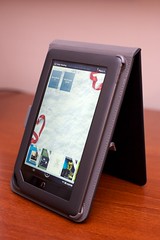
My first week with the NOOKcolor
Here’s my real-person experience with the Barnes & Noble Nook Color eReader
. I’ve owned and used my NOOKcolor for a week now. In my review, I will answer three questions: “Why buy the NOOKcolor instead of the iPad
or Samsung Galaxy Tab
?”, “What do you wish you had known before you bought the NOOKcolor?”, and “What do you love about the NOOKcolor?”
Why not just buy the iPad or Galaxy Tab?
The NOOKcolor is half the price of the cheapest iPad, and even with a cover is less than half the price of the Galaxy Tab; it has a beautiful 7″ wide-screen-format full color LCD (which I actually find to be a better fit for my hands than the iPad); it comes with 8 GB internal memory and a MicroSD card slot for expansion (which the iPad doesn’t have); it has a full web browser (Google Chrome) that allows you to view anything on the Web that isn’t made with Macromedia Flash (which the iPad doesn’t support, either), and it has QuickOffice software that allows you to view Word, Excel, and Powerpoint documents. It allows you to drag and drop (with a standard MicroUSB cable, not the proprietary iPod/iPad connector) files such as audiobooks, music, photos, documents, etc. for listening and viewing (even in a photo slideshow) on the pretty screen. There are a few games (Chess, Crosswords, Sudoku), and you can use the Pandora app to listen to streaming music if you get bored of the music files you loaded into the device. There may be more “Extras” to come (free or for purchase), as well. As for the Galaxy Tab, I don’t need a portable videoconferencing device, and I don’t need another Android phone. I still like my Nexus One
, thanks.
As for the NOOKcolor’s web browsing capabilities, so I have watched YouTube videos, checked my GMail, caught up on Facebook and Flickr, read content on news websites, downloaded content from the Barnes & Noble store (some free or 99¢ public domain books) and free ePub download sites, and managed my Netflix queue. Primarily, though, I enjoy the NOOKcolor for reading e-books. Go figure! I’m not a big gamer, so I don’t care about iPad games designed for the accelerometer, and I don’t expect to do much document creation on a tablet, so I don’t miss iWork. For my intents and purposes, the NOOKcolor does everything I would want the iPad or Galaxy Tab to do— for half the price.
What I wish I had known before I bought the NOOKcolor
- You can only use the LendMe™ feature once per book—only one time the whole time you own the book!—and you can only use the LendMe™ feature with a limited selection of Barnes & Noble books, not with all of them! You can only “lend” a B & N book for seven days— just long enough for your friend to get hooked and click “Buy Now” to buy it from Barnes & Noble, unless they read fast and don’t put off starting the book. In other words, LendMe™ isn’t to help you save money; it’s to help B & N make money.
- You can only use the Share feature to post quotations, write reviews, make recommendations, etc. about Barnes & Noble books, not with any other books! Yes, the Barnes & Noble books are standard ePub, but they’re specialized in such a way that your NOOKcolor knows if you’re reading any other ePub and it won’t let you use the Share feature with anything but their books. What this means is that you have to pay, say, $1 or $2 for a public domain book you can get free elsewhere for the privilege of giving Barnes & Noble free advertising so your friends are encouraged to buy these old public domain books from them instead of downloading them from any number of other ePub download sites.
- On a related note: the only books that are guaranteed to show up in your library with cover art are your Barnes & Noble books. This may be a bug they will fix, but I wouldn’t count on it. Why? Because having their books and not other supplier’s books show up with eye candy is another reason for you to buy books from them. It’s a way of devaluing the competition’s product and making you want to fill your virtual bookshelves with books that look pretty. When you drag and drop ePub books you got from other places, what you get on your NOOKcolor screen is just a little gray rectangle with a text title that’s often truncated. When you buy a B & N book, you get the full color cover art. Nice, eh? You also sometimes get little badges that say “Sample” or “New” or “LendMe™” on the B & N book covers—dandy.
- You will have to charge your NOOKcolor every day with regular use, and be sure to bring your NOOKcolor charger with you if you’re planning to use it a lot in a day and be away from home all day.
Bitter? Not really; just disillusioned. I still ♡ my NOOKcolor, and here’s why:
What do you love about the NOOKcolor?
- I love its size and shape and curves
- I love its gorgeous touch screen
- I love its intuitive interface
- I love that it’s a pleasure to read on*
- I love that it has WiFi and a full Web browser that lets me see anything on the Internet I want (as long as it’s not Flash)
- I LOVE the dictionary— a must have, I think, for any ebook reader. With the dictionary on the NOOKcolor, it will also take you to Wikipedia or Google if you have a WiFi connection and want more info.
- I love how easy it is to rate books you’ve gotten from the BN website, and I think I’ll love the LendMe™ feature because it’s better than not being able to share books and/or try them before you buy them.
- Oh, and I do like it that you can spend up to an hour in a Barnes & Noble store reading a book free of charge, although I don’t know if I’ll ever actually do it, and—again—I’m sure it’s designed to make them money, not save you money.
So, there’s my honest opinion about the NOOKcolor. I’m glad I got it. I chose it carefully over the e-readers from other manufacturers such as Amazon, Apple, and Sony. I would recommend the NOOKcolor to a friend. Or to you! And, of course, because I care about my friends, and about you, “Gentle Reader,” I’m warning you of its shortcomings as well.
Did this review help you? Did it save you $300? If so, would you reward the time I took to write this for you by giving me a small donation of even $1? I work hard on these blog posts and I do them without sponsorship from tech companies or advertisements. If you like, please give.

*P.S. I just have to laugh at the television ad with the woman reading her Kindle
at the pool next to a guy who can’t read on his iPad. I don’t read at the pool! In fact, I can count on my fingers and toes the number of minutes I spend on the deck of a pool each year. I need an e-reader to be easy to read indoors without having to sit directly under a lamp or with a booklight.

 Daniel Greene