I’ve been looking for a theme that will support my WordAds account, support post formats, and show my byline. As of this writing, only 57 out of 206 themes support post formats. Only 24 support post formats and WordAds. I wonder how many of those 24 show bylines. Let’s see: (more…)
Category: Business
My experiences in business and as a customer of businesses
-
Ever forget an assignment? Make it less likely with automatic agenda emails.
 I hate to admit it, but there have been those mortifying times when I’ve forgotten I had a job to get to. It’s easy to follow a schedule when it’s the same every day, but when you’re a community interpreter and your schedule changes every day, you might need a little help.
Lately, some of the agencies I work for have started sending out automatic agenda reminders via email, such as “Here is your schedule for this week” or “Here is your schedule today.” These reminder emails are very helpful — so helpful I was about to ask an agency who doesn’t send them to send them. I rethought that, though, because I had forgotten a job with them that week and I didn’t want it to come across as, “Well, it would help if you sent me a reminder.” So I did some searching and found that I could set up my own email reminders in my Google calendar. Here’s how:
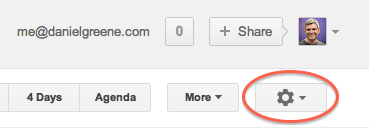
In your Google calendar, go to Settings. Currently the way to do this is to click on the gear icon in the top right corner of the page. When in Settings, click the Calendars tab from the tabs toward the top left of the page (where you see General, Calendars, Mobile Setup, Labs). For your work calendar, look for the Notifications heading just right of the center of the Calendar line (where you see CALENDAR, SHOW IN LIST, NOTIFICATIONS, SHARING). Follow the Notifications link for your work calendar. Scroll to the bottom of the page where it says, “Daily agenda: Receive an email with your agenda every day at 5am in your current time zone.” Check the box next to Email and/or SMS, and you’re done! You will now get your very own agenda reminders at the crack of dawn.
Go forth and serve thy Deaf and hearing consumers!
P.S. I know not everyone uses Gmail or Google Apps, but maybe the calendaring program you use does this too. If not, maybe you should get with a program that does.
-
Settings vs. specializations: Categorizing interpreting work

Interpreter Patricia Stöcklin whispers interpreting to Garry Kasparov. Klaus Bednarz is speaking on the lit.Cologne 2007 Français : L’interpréteur Patricia Stöcklin traduit en chuchotant à Garry Kasparov. Klaus Bednarz parle au lit.Cologne 2007. (Photo credit: Wikipedia) Is “freelance” a setting? I’ve heard people say they used to be “educational” and now they’re “freelance.” What they mean is they used to be employed full-time at a school and now they work as an independent contractor for agencies. Yet interpreters can work full-time in schools and be “freelance” if they’re working at that school as independent contractors. By the same token, there are interpreters who work for agencies as full-time employees, and they do doctor’s appointments, business meetings — the same kinds of work as interpreters who call themselves “freelancers.” I think interpreters get their settings and specialties mixed up, and I think it can cause confusion to those entering the field, those who hire us, and even ourselves and each other. Knowing what’s what can give everyone a better understanding of what we do. Here is how I suggest we distinguish interpreting settings from interpreting specialties: (more…)
-
Interpreters beware of “SERVICE NEEDED !!!” scam
In case you haven’t already seen it, the following email is going around. Gmail was wise enough to put them both in my spam folder. I will quote both so you can see how suspicious they are:
Here is the first one:
from: Engr Ivan Bruce bengrivan@gmail.com
to:
bcc: danieljamesgreene@gmail.com
date: Fri, Jun 29, 2012 at 1:50 AM
subject: YOUR SERVICE !!!Hello,
I’m Engr Ivan,I would like more info about your interpreting service,I will be attending 4days conference in your city on 25th-28th of July to some student(deaf).Kindly let me know your charges per hr and details about your interpreting service(ASL) so that i will book ahead before coming.
You can mail me directly on
IvanBruce@usa.com
Await your reply.
Engr Ivan BruceAnd here is the second one:
from: Dr Russell Park drrussellp@gmail.com
to:
bcc: danieljamesgreene@gmail.com
date: Fri, Jul 6, 2012 at 3:53 AM
subject: SERVICE NEEDED !!!Hello,
I’m Dr Russell,I would like more info about your interpreting service,I will be attending 4days conference in your city on 27th-30th of August to some student(deaf).Kindly let me know your charges per hr and details about your interpreting service(ASL) so that i will book ahead before coming.
You can mail me directly on
Rpark@dr.com
Await your reply.Dr Russell Park
Notice how impossibly similar they are? Note the subject line in ALL CAPS with three exclamation marks — not signs of professionalism. Note also the grammatical errors like the comma splices, the absence of spaces after commas and before open parentheses, the lack of hyphen and the ungrammatical s in “4days conference,” the lack of period after the abbreviation for hour (“hr”) and the lowercase i. Your English teacher was right; grammatical errors reduce your credibility, and so they should. Finally, note how they each ask you to reply to email addresses other than the address the emails were supposedly sent from. I don’t know what their scam is, but there’s obviously something afoot.
Related articles
- 10 Most Common Types of Internet Scams (blogs.lawyers.com)
- Beware the New LinkedIn Email Phishing Scam – (Info h/t Virgin Digital Help) (geardiary.com)
-
Notes on “A Conversation with Translators”
 I enjoyed watching the live feed of the Endless Possibilities Talks this afternoon. The Google+ Hangout on Air was viewable from within Google+ and on YouTube. Gerda S Prato-Espejo posted commentary on Twitter using the hashtag #EPT, and others including myself posted comments and questions using same hashtag. (The purpose of using the same hashtag is you can view a search of all Tweets with that hashtag, and refresh it often to keep up with the conversation.) (more…)
.jpg)
 Daniel Greene